| Support Category: Navigation |
| Specialist Notes: |
Some users, instead of closing the Percipio Course window when they finish a course, may click the GSA Logo on the top left corner of the window. This leads them to the GSA Percipio portal which may also be accessed directly by going to: https://gsa.percipio.com/
Here are a couple of navigation-related inquiries we may see:
- Locating a course - Should a user need assistance locating a percipio course, channel, material, etc. please advise the user to search the OLU and launch the course from there. This is to prevent issues with it not showing up in their transcript.
- Skill benchmark - Users can click the 'Skill Benchmarks' tab if they're on the homepage https://gsa.percipio.com/ or if they're on a channel's page, they can click the 'Assess' tab which will take them to the skill benchmark as well. [see example below]
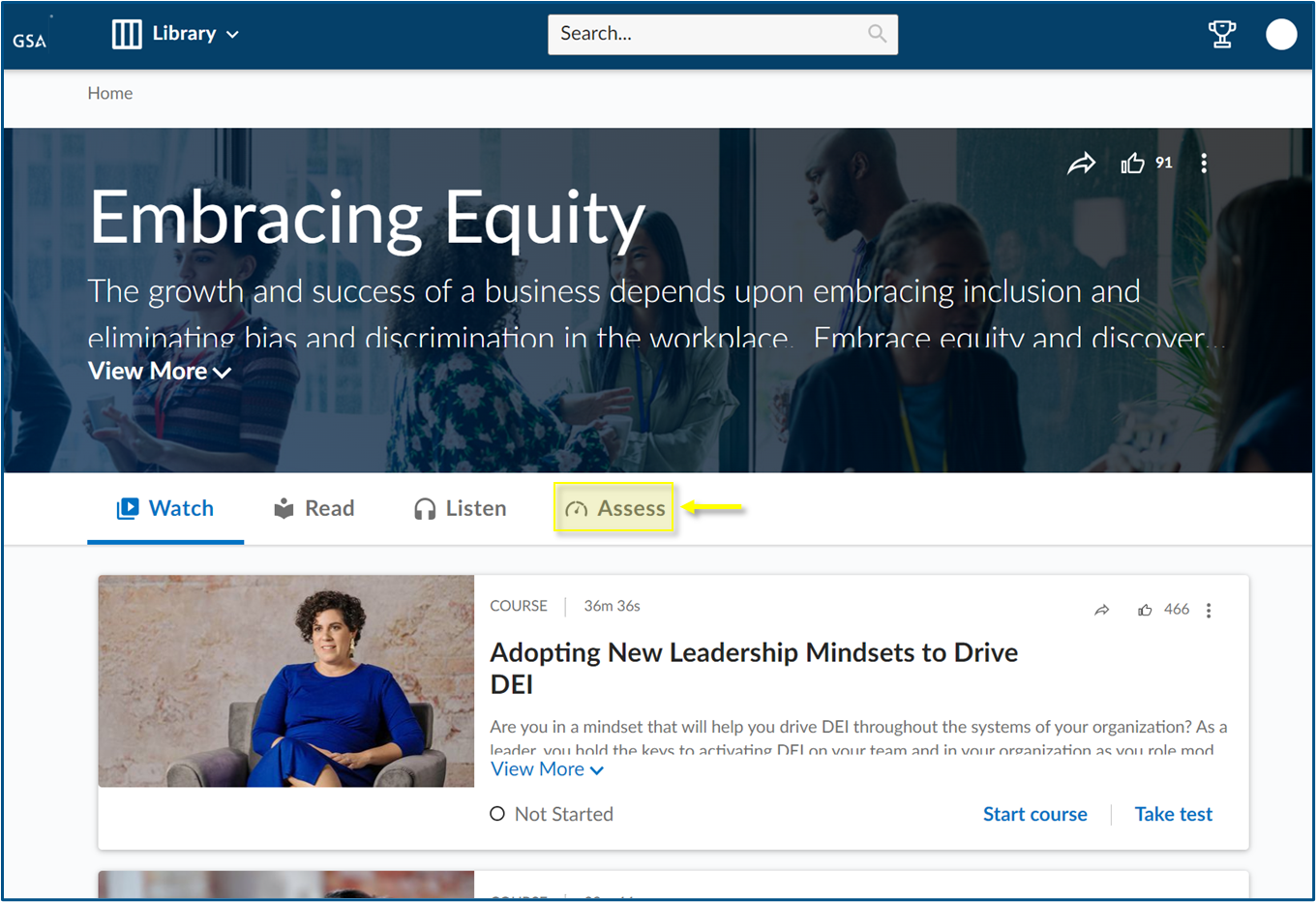
For other navigational-related inquiries, please browse around (if you have GSA access) and see if you can easily find what the user is looking for. For specific questions, though, please use the following SR to direct them to the percipio help page.
Note: For technical issues (error messages, etc.) we need to create a ticket to escalate it to the Admins instead.
| Standard Response: |
For further information, you may visit the following page: https://gsa.percipio.com/help. Should you need further assistance, please contact the Percipio support team by clicking the chat or ticket option at the bottom of the help page.
