| Support Category: SF-182 External Training |
| Specialist Notes: |
External Training Requests are done via the SF-182 form which is completed and submitted in the GSA Online University (OLU). To submit it, users will need to navigate to their transcript and then click the three-dot button located at the top right, and then click the option to add. [see image below]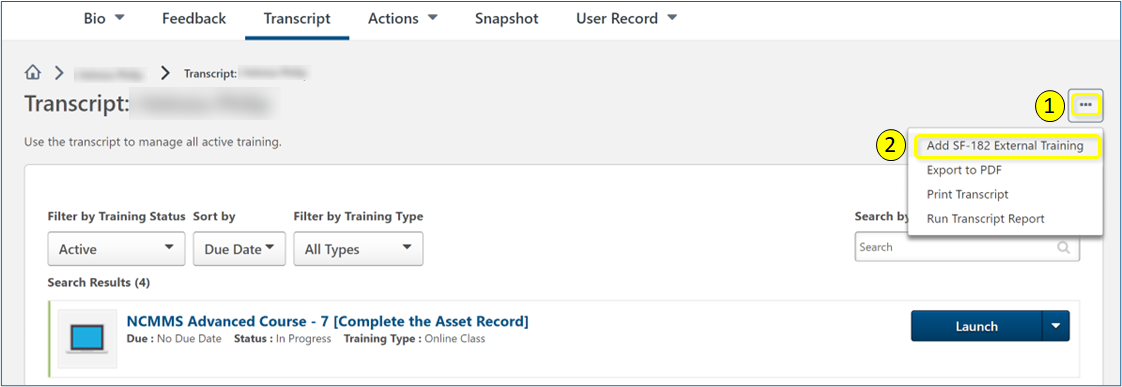
The SR below contains direct links to resources regarding SF-182. The email contact is for further questions like when, how, or why. However, should the issue be a technical issue, please escalate a ticket so we can send it to the Administrators.
IMPORTANT! Please advise users to shorten their entry for the Skill Learned Objective field as a troubleshooting step to see if the form goes through. To access the links, please ensure users are logged into their GSA OLU accounts. |
| Standard Response: |
We in End-User Support can certainly assist with technical issues related to SF-182. However, for non-technical support, the GSA OLU Administrators ask that you refer to the Job Aids shared in the Knowledge Bank. Please see the links below.
Note: Please make sure you're logged into your OLU account when accessing the links.
Employee Job Aid:
https://gsa.csodfed.com/clientimg/gsa/LiveFeed/c695313d-f922-460c-93bd-5291854d914f_GSA_JobAid_EndUser_SF182_3_5_24__508_Pass_.pdf
Supervisor Job Aid:
https://gsa.csodfed.com/clientimg/gsa/LiveFeed/da414dc3-f9a5-4e47-829d-6f62af0aa5d6_GSA_JobAid_Supervisor_SF182__508_Pass___1_.pdf
For further information/support, please reach out to the SF-182/IDP Team directly via: SF182-IDPteam@gsa.gov.
